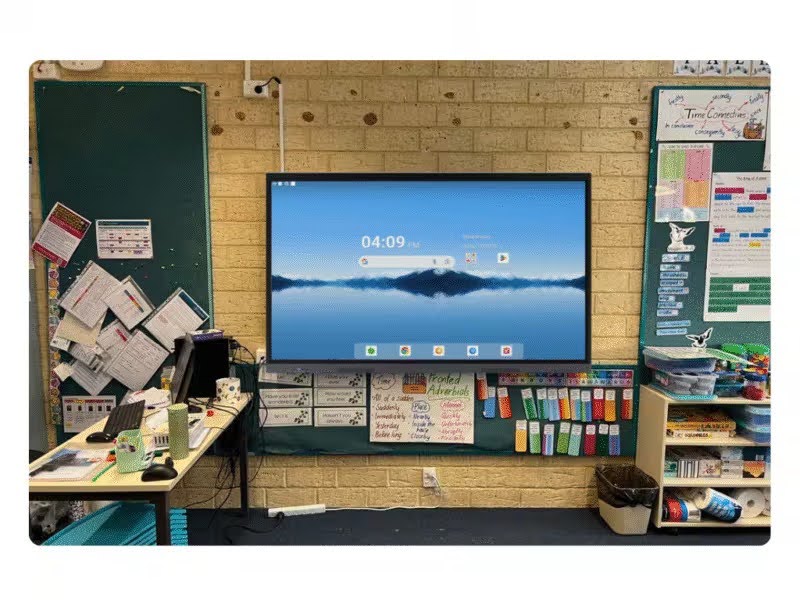
Classroom interactive displays give teachers a tool that turns passive viewing into active participation, and students respond to that shift immediately.
When a lesson moves from a teacher talking at a static display to students touching, annotating, and contributing directly to the screen in front of them, the dynamic changes completely.
Schools across Western Australia are investing in interactive panels precisely because students learn better when they are actively involved rather than passively watching.
What Are Classroom Interactive Displays?
Interactive displays are large-format touchscreen panels that replace traditional whiteboards, projectors, and static screens. They run on built-in operating systems, typically Android, and allow teachers and students to write, draw, annotate, browse the web, run software, and share content from connected devices, all on a single surface.
The modern classroom interactive display is a purpose-built teaching and learning system that integrates with existing school technology, supports multiple input types and comes with dedicated education software designed to make lessons more dynamic.
3 Monkeys AV supplies and installs the EduTouch range of interactive panels, which are available in sizes from 55 to 98 inches and come bundled with free education software applications.
The EduTouch panels feature 4K ultra-high-definition displays, 20-point touch input, anti-glare toughened glass, and a 7-year on-site warranty.
How Classroom Interactive Displays Create More Engaging Learning Experiences?
The shift from a static display to a classroom interactive display changes what is possible during a lesson, and students notice it instantly.
Here is how that engagement improvement plays out in practice:
- Students move from watching to doing: When the display responds to touch, students can come up and interact directly with the content, like solving a problem on screen, moving elements around, annotating a diagram, rather than simply watching the teacher work through it.
- Lessons become visually dynamic: A teacher can pull up a live web page, annotate over a video mid-playback, or sketch a diagram freehand and have it saved automatically, all without switching between different tools.
- Group work becomes visible to the whole class: Students working in groups can share their device screen wirelessly to the main display, presenting their thinking to classmates in real time without needing to re-create anything.
- Instant feedback loops are possible during lessons: Teachers can use interactive tools to run quick polls, drag-and-drop sorting activities, or live quizzes where every student participates and results display immediately.
- Content can be saved and shared after the lesson: Notes, diagrams, and annotated content from the board can be exported and sent to students so they are not scrambling to copy things down during class.
What Are The Key Features of Interactive Classroom Displays That Support Student Engagement Technology?
Not every interactive panel is built with the classroom in mind. The features that matter most for student engagement technology in an educational setting are specific and practical:
- 20-point multi-touch input: This allows multiple students to interact with the display simultaneously, which is essential for collaborative activities where small groups work on different parts of the screen at the same time.
- 4K UHD resolution with anti-glare glass: Sharp, clear visuals make a real difference in a classroom where students sit at various distances from the screen. Anti-glare glass ensures readability under varied lighting conditions, including classrooms with natural light from windows.
- Built-in whiteboarding and annotation tools: Teachers need to draw, highlight, and annotate over existing content without switching applications. A built-in whiteboarding function makes this seamless.
- Wireless screen sharing from student devices: When students can share their tablet or laptop screen to the main display wirelessly, collaborative learning and peer presentations become practical in everyday lessons rather than occasional events.
- Bundled education software: The EduTouch panels come with a suite of education applications included at no extra cost, giving teachers ready-made tools for interactive lessons without requiring additional software purchases.
- Compatibility with Windows, macOS, Android, and iOS: Teachers and students use a mix of devices across Australian schools. A display that works with all of them reduces friction and keeps lessons moving.
How Digital Classroom Solutions Benefit Teachers and Students?
Teachers gain tools that make content delivery more flexible and responsive, while students benefit from a learning environment that holds their attention and supports their participation. For teachers, the practical benefits include:
- Preparation time for dynamic lessons decreases once templates and lesson resources are saved on the panel and ready to use at the start of each class.
- Differentiation becomes easier to deliver when the same display can run different content formats like video, interactive activities, annotated documents, and web-based resources within a single lesson.
- Classroom management improves when students are actively engaged with what is on the screen rather than distracted or disengaged from a passive lecture.
For students, digital solutions shift the learning experience in concrete ways:
- Hands-on interaction with content supports retention: The act of physically engaging with a concept reinforces learning in a way that passive viewing does not.
- Visual and kinaesthetic learners are better served: Not every student learns well from listening alone. A touchscreen display gives different types of learners a way to engage with content that suits how they process information.
- Confidence grows when students can contribute: Coming to the board to demonstrate thinking is far less intimidating on a responsive, intuitive touchscreen than on a traditional whiteboard under pressure.
What Are the Best Practices for Integrating Classroom Interactive Displays into Daily Lessons?
How teachers use the technology day-to-day determines how much of its potential gets realised. These practices consistently produce better outcomes:
- Start with one or two features and build from there: Trying to use every capability of a new display at once is overwhelming for teachers and students alike. Begin with annotation and wireless screen sharing, then expand as confidence builds.
- Use the display for collaborative activities: The full value of student engagement technology emerges when students are regularly interacting with the screen, not just watching the teacher use it.
- Integrate it into existing lesson plans gradually: A new tool works best when it enhances what you already do well, rather than replacing your whole approach overnight. Start by digitising activities that already work and adding interactivity from there.
- Set clear expectations for when students approach the display: Establishing a routine for how and when students use the touchscreen keeps the activity purposeful rather than chaotic.
- Take advantage of the session-saving feature after every lesson: Saving annotated notes and diagrams means students who were absent or who need to revisit content can access an accurate record of what happened in class.
3 Monkeys AV provides staff training as part of every installation, ensuring teachers are comfortable and confident with the system before they use it in front of a class for the first time. Schools that invest in proper initial training see far faster adoption and much more consistent day-to-day use.
How to Choose the Right Interactive Classroom Displays for Your School?
The right classroom interactive display for your school depends on room size, year level, subject mix, and how existing devices are used. There is no single answer that suits every school, which is why a proper assessment matters before any purchase. Here are the practical decisions that shape the right choice:
- Screen size should match room dimensions and class size: A 65-inch display suits a small group learning room or a junior classroom with students seated close to the front. A standard secondary school classroom with 30 students needs at least 75 to 86 inches for clear visibility from the back of the room.
- Mounting options affect how the display is used: A fixed wall mount is the standard choice for a permanently assigned classroom.
An automated height-adjustable trolley makes sense in spaces shared by different year groups, allowing the screen to be positioned at the right height for primary students or secondary students with a push of a button.
- Warranty and support matter more in schools: Classroom displays face daily use by dozens of students, and a failure mid-term is disruptive.
The EduTouch range, backed by 3 Monkeys AV, comes with a 7-year onsite warranty, which means repairs and replacements are handled without the school needing to manage logistics.
Schools in Perth and across Western Australia can access expertise in audio visual in Perth through 3 Monkeys AV, WA’s only authorised EduTouch supplier.
The team carries out a free site assessment for every school, matching the right panel size, touch technology, and mounting solution to the actual classroom before any money is spent.
Every project runs directly through the 3 Monkeys team with no subcontractors involved.
Closing Thoughts
Interactive classroom displays are a practical improvement to how learning happens every day.
They make lessons more engaging, give students more ways to participate, support teachers with flexible and time-saving tools, and produce better outcomes for the full range of learners in a classroom.
If your school is still relying on ageing projectors or static screens, the gap between what your teachers can do and what is now possible with current digital classroom solutions is wider than you might expect.
A free site assessment is the easiest way to find out what the right setup looks like for your specific spaces.
About the Author
Hall Jackson is a trained Primary school teacher with experience in both the public and Private K-12 systems in Western Australia. He has also taught in the UK and Japan, with telecom and technology experience in Toronto Canada. For the Last 17 years Hall has been helping organisations and schools in Perth with Audio Visual and Information Technology Solutions, including sourcing, installing and training. Hall has presented at a number of Local, national and international conferences particularly in the effective use of technology for teaching and learning.