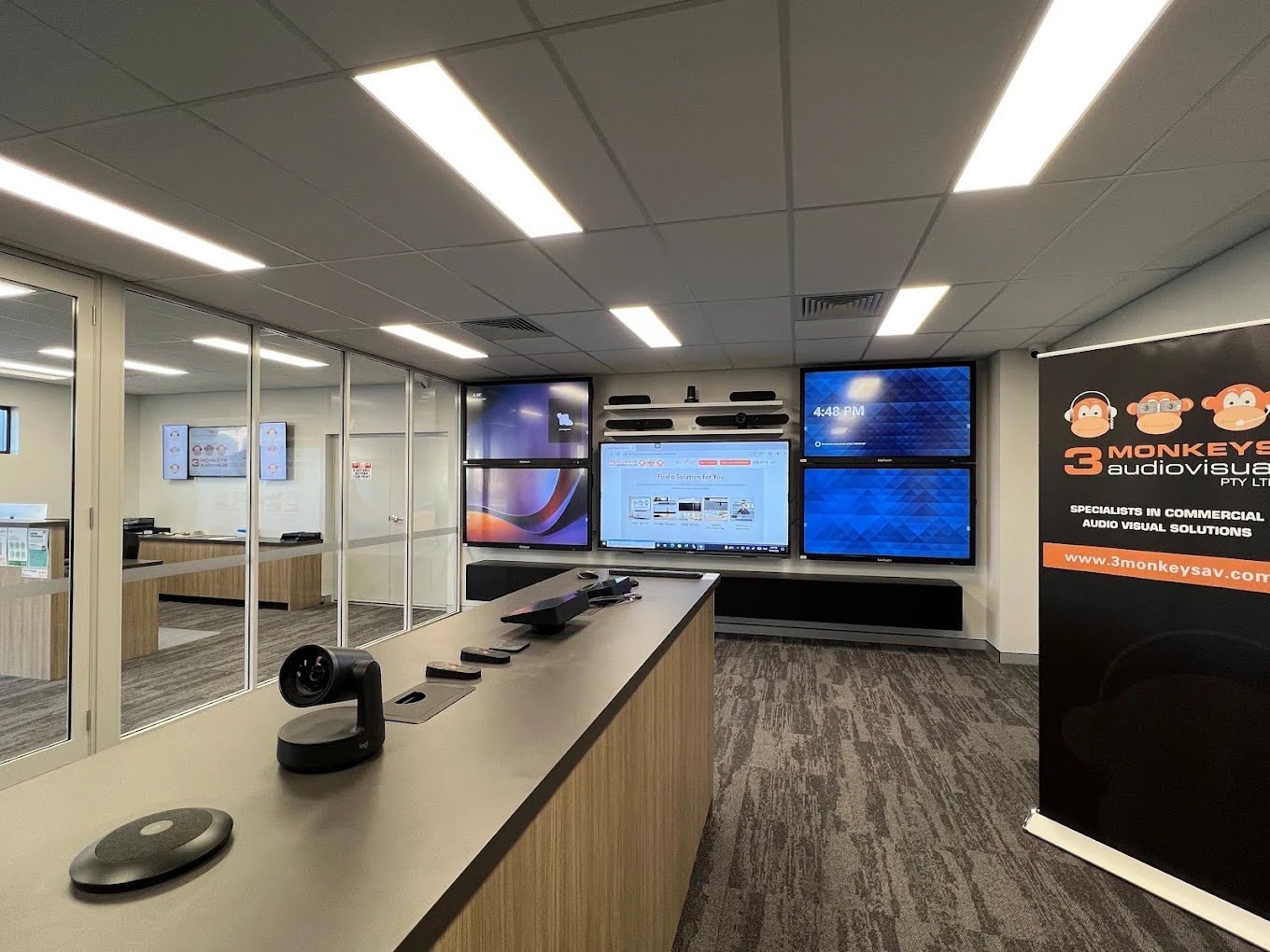
The quickest way to reduce meeting room downtime is to invest in purpose-built video conferencing systems rather than cobbling together consumer-grade gear and hoping for the best.
When your conference room equipment is properly selected, professionally installed, and regularly maintained, technical failures stop being a regular part of the working week.
A dropped connection, a camera that will not launch, or a microphone that everyone in the room can hear except the person on the other end. These issues cost real time and real money.
Professional video conferencing installation is what separates a meeting space that reliably works from one that your team actively avoids booking.
Why Reliable Video Conferencing Matters for Business Continuity
Unreliable meeting room technology is not just an inconvenience. It has a direct and measurable impact on business continuity.
When a video conference fails mid-meeting, the consequences stack up quickly. Decision-making gets delayed. Client calls need to be rescheduled. Staff waste time troubleshooting instead of contributing.
Over the course of a year, even a few minutes of downtime per meeting adds up to dozens of hours of lost productivity across your organisation. Reliable systems solve this by doing what they are supposed to do, every single time:
- Calls connect within seconds rather than requiring manual configuration or a reboot before each session.
- Audio and video quality stays consistent throughout the meeting, even as participants join and leave.
- The system integrates with your calendar and booking tools so rooms are used efficiently and double-bookings are eliminated.
- Faults are detected early through monitoring tools built into enterprise-grade conference equipment, rather than discovered mid-call by a frustrated team.
What Are The Essential Conference Room Equipment for Reliable Video Conferencing Systems?
The quality of a video conference is only as good as the weakest link in the room’s setup. Getting the core hardware right from the start is what prevents most downtime. Here is what a properly equipped meeting room needs:
- A dedicated video bar or camera system: Consumer webcams are not built for conference room environments.
Professional options like the Logitech Rally Bar or the Yealink A40 Bar offer automated PTZ tracking, wide-angle lenses, and processing that handles variable room lighting far better than a laptop camera can.
- A microphone array suited to the room size: A small huddle space works well with an all-in-one conference bar featuring built-in audio.
Larger boardrooms need ceiling array microphones or beamforming table units so every voice in the room is captured cleanly, regardless of where participants sit.
- Echo cancellation and noise suppression processing: Without this, remote participants hear themselves echoed back, conversations become difficult to follow, and meeting fatigue sets in fast.
- A reliable display sized correctly for the room: A screen that is too small for the space means participants cannot read shared content, which defeats the purpose of the meeting.
- A room control panel or touch interface: A single panel that manages the call, the display, the audio, and the room lighting removes the guesswork for staff and ensures the system is used correctly every time.
- A stable, dedicated network connection: Video conference performs far more reliably on a wired or dedicated wireless network than on a shared office Wi-Fi network that fluctuates throughout the day.
3 Monkeys AV designs and installs complete packages for boardrooms, meeting rooms, and huddle spaces across Perth, pairing the right hardware to the room size and meeting frequency of each space.
What Are The Best Practices for Reducing Meeting Room Downtime with Video Conferencing Systems?
Having the right equipment is the foundation, but how you manage and use it determines whether downtime stays low over time. These practices make a measurable difference:
- Standardise your setup across meeting rooms: When every room runs on the same video systems and control interface, staff learn the setup once and apply it everywhere. Rooms with unique, incompatible setups create confusion and avoidable errors.
- Schedule regular preventive maintenance: Firmware updates, connection checks, and equipment inspections catch problems before they interrupt a meeting. An annual support plan from a provider like 3 Monkeys AV keeps your systems current and your team supported.
- Post simple, laminated quick-reference guides in each room so staff can resolve basic issues like switching inputs or adjusting volume without calling IT.
- Run a test call before high-stakes meetings such as client presentations or executive briefings. A five-minute pre-check prevents a thirty-minute delay.
- Keep a spare HDMI cable and USB-C adapter in each room: Connectivity cables are the most common point of failure in meeting rooms, and the fix takes seconds when a replacement is on hand.
- Log recurring faults: If a specific room or piece of equipment generates repeated complaints, that pattern points to a hardware issue or installation problem worth addressing properly.
- Ensure all software platforms are kept up to date on room systems. Outdated software causes compatibility issues with remote participants running newer versions.
How Hybrid Meeting Solutions Improve Business Productivity?
The modern Australian workplace is increasingly split between in-office and remote staff.
Hybrid meeting solutions are what allow those two groups to collaborate without one side feeling like an afterthought. When hybrid meetings work properly, the whole organisation benefits:
- Remote participants see and hear the room as if they were there. Auto-framing cameras keep the active speaker in view, and clear audio means no one has to repeat themselves.
- In-room participants can engage with remote colleagues naturally. A properly sized display showing remote faces at near-life size changes the dynamic of a meeting completely.
- Flexible working becomes genuinely viable. When staff trust that a hybrid call will be just as productive as an in-person meeting, they make better decisions about where to work on any given day.
Office pods with integrated video conferencing are a growing part of the hybrid meeting solution for open-plan offices.
These acoustically insulated spaces give staff a private, quiet environment for calls without the need to book a full meeting room.
3 Monkeys AV offers a range of one, two, four, and six-person pods with optional BYOD video conferencing built in.
When hybrid meeting solutions are implemented well, they close the gap between remote and on-site work rather than just bridging it awkwardly.
What Are the Common Video Conferencing Challenges and How to Prevent Them?
Even with good equipment, certain problems come up repeatedly in business meeting rooms. Here is how to get ahead of them:
- Echo and feedback during calls: This usually means the room’s microphone is picking up the speaker audio. The fix is acoustic treatment, better microphone placement, or switching to a system with professional-grade echo cancellation built in.
- Poor video quality in low-light rooms: A camera with low-light compensation helps, but the room also needs adequate, even lighting, particularly facing the participants rather than backlighting them from behind.
- Remote participants cannot hear one part of the room: This is almost always a microphone coverage issue. A single tabletop mic rarely covers a full boardroom. Ceiling arrays or multiple tabletop units solve this.
- The system does not connect to the platform staff are using. Conference equipment certified for Microsoft Teams or Zoom Rooms avoids cross-compatibility issues entirely. 3 Monkeys AV holds certifications on both platforms.
- Staff bypass the installed system and use their laptop instead. This happens when the installed system is too complex to use quickly. Simplifying the control interface or providing better training resolves the behaviour.
- Wireless presentation tools drop out mid-meeting. This is usually a network issue. A dedicated VLAN or wired backup option keeps content sharing reliable.
How to Choose the Right Video Conferencing System for Your Business?
The right systems for your business depend on how your rooms are used, how many participants join remotely, and what platforms your teams rely on daily. Start by answering these questions before selecting equipment:
- Room Size: Small huddle rooms require different cameras, microphones, and speakers than large boardrooms or conference spaces. Choose equipment designed to provide clear audio and video coverage for the size of your room.
- Meeting Type: Consider whether the room is primarily used for internal team meetings or external client and partner calls. Spaces that regularly host external meetings often benefit from higher-quality cameras, microphones, and displays to deliver a more professional experience.
- Collaboration Platform: Select a system that is certified for the platform your organisation uses most, such as Microsoft Teams or Zoom. Platform-certified solutions provide better performance, simpler management, and a more reliable user experience than generic systems.
- Hybrid Meeting Requirements: If your business regularly hosts hybrid meetings, invest in high-quality microphones, intelligent cameras, and appropriately sized displays. These features help ensure both in-room and remote participants can communicate and collaborate effectively.
3 Monkeys AV offers a free AV systems analysis as a starting point. A practical site assessment worth $250 that maps your spaces to the right solutions before any money is spent on equipment.
With more than 10,000 installations completed across Perth and Western Australia, the team brings the kind of experience that means recommendations are based on what actually works in real rooms, not what looks good in a brochure.
Closing Thoughts
Meeting room downtime is a solvable problem. It comes down to choosing the right conference equipment for each space, having it professionally installed, keeping it maintained, and giving your staff the confidence to use it without a support call.
Businesses that invest in reliable systems stop losing time to technical failures and start getting more value out of every meeting.
The starting point is to talk to a specialist who understands both the technology and how Australian workplaces actually use it.
About the Author
Hall Jackson is a trained Primary school teacher with experience in both the public and Private K-12 systems in Western Australia. He has also taught in the UK and Japan, with telecom and technology experience in Toronto Canada. For the Last 17 years Hall has been helping organisations and schools in Perth with Audio Visual and Information Technology Solutions, including sourcing, installing and training. Hall has presented at a number of Local, national and international conferences particularly in the effective use of technology for teaching and learning.