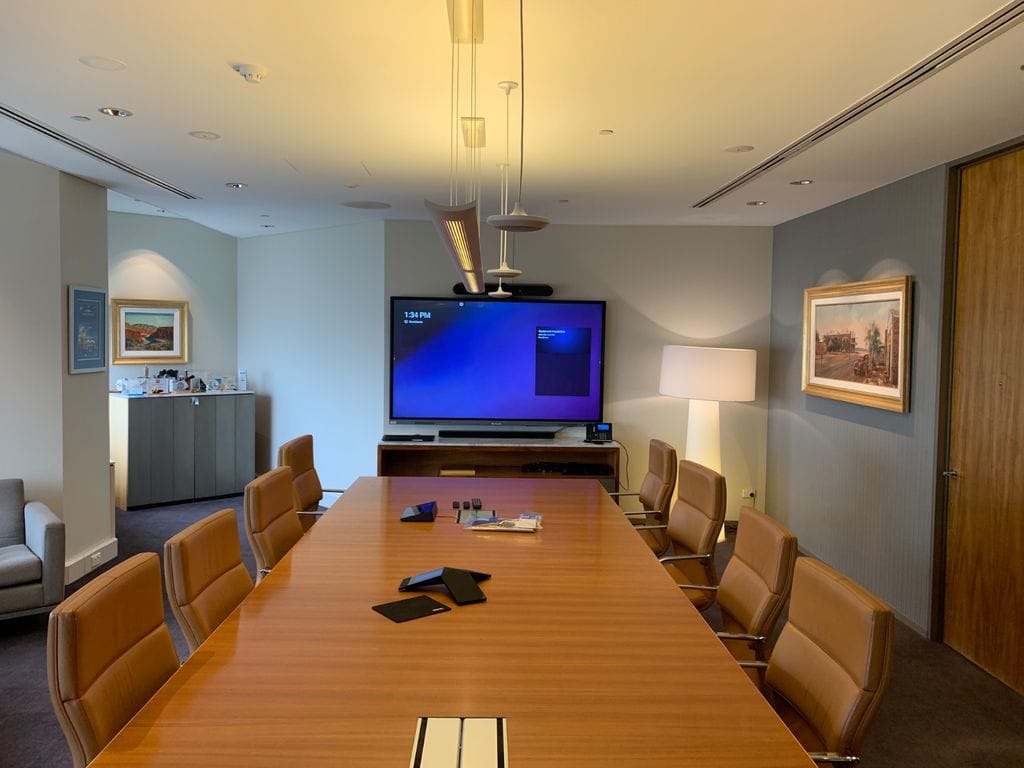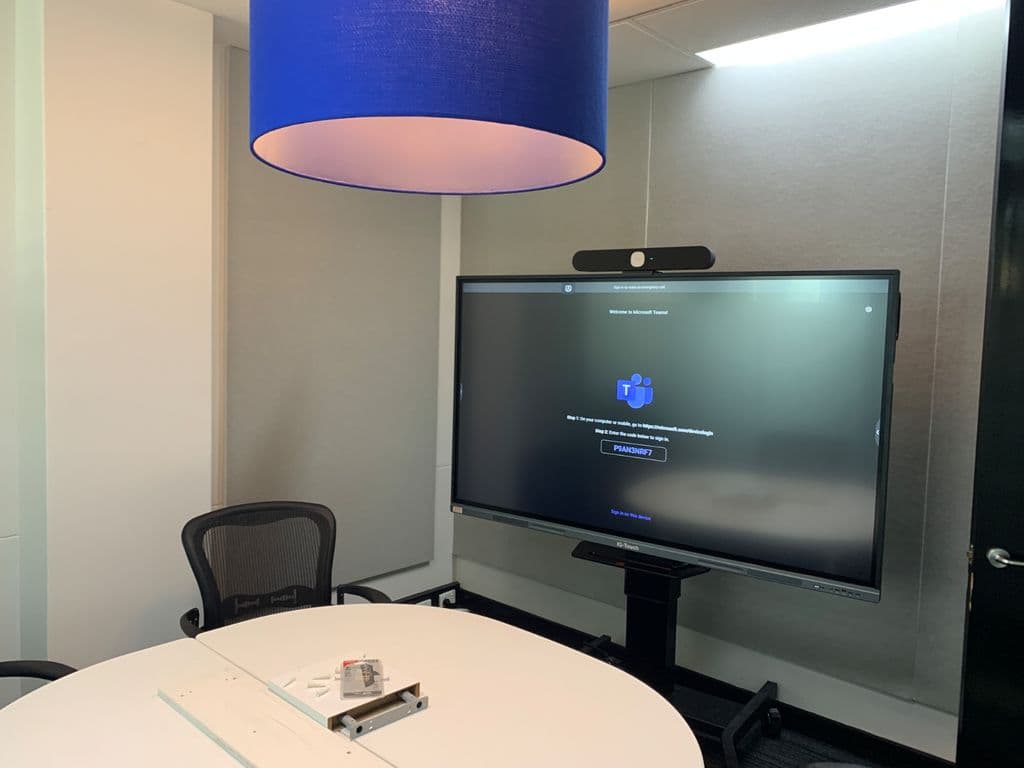
Enhancing Communication through Video Conferencing at Perth Observatory
By Jacinta,

Clients Requests/Goals:

Perth Observatory’s primary objectives were to establish a comprehensive video conferencing solution that streamlined communication and ensured clear audio quality. Furthermore, they aimed to enhance the acoustic environment in the classroom to eliminate sound-related distractions.

Site Visit & Discussions:

A comprehensive site visit was conducted, enabling us to gain an in-depth understanding of the existing infrastructure and room conditions. During this visit, we engaged in extensive discussions with the Perth Observatory team to align our solution with their specific needs and challenges.

Challenges:

One of the main hurdles we encountered was the poor sound quality within the classroom. Achieving clear and consistent audio was vital to meet the client’s communication goals.

Solutions Proposed:

To address the client’s requirements, we recommended the Logitech Rally Bar video conferencing solution, which integrated seamlessly with their existing EduTouch Interactive Panel. The Logitech Rally Bar was chosen for its ability to provide an all-in-one video conferencing solution, ensuring ease of use and impeccable audio and video quality.

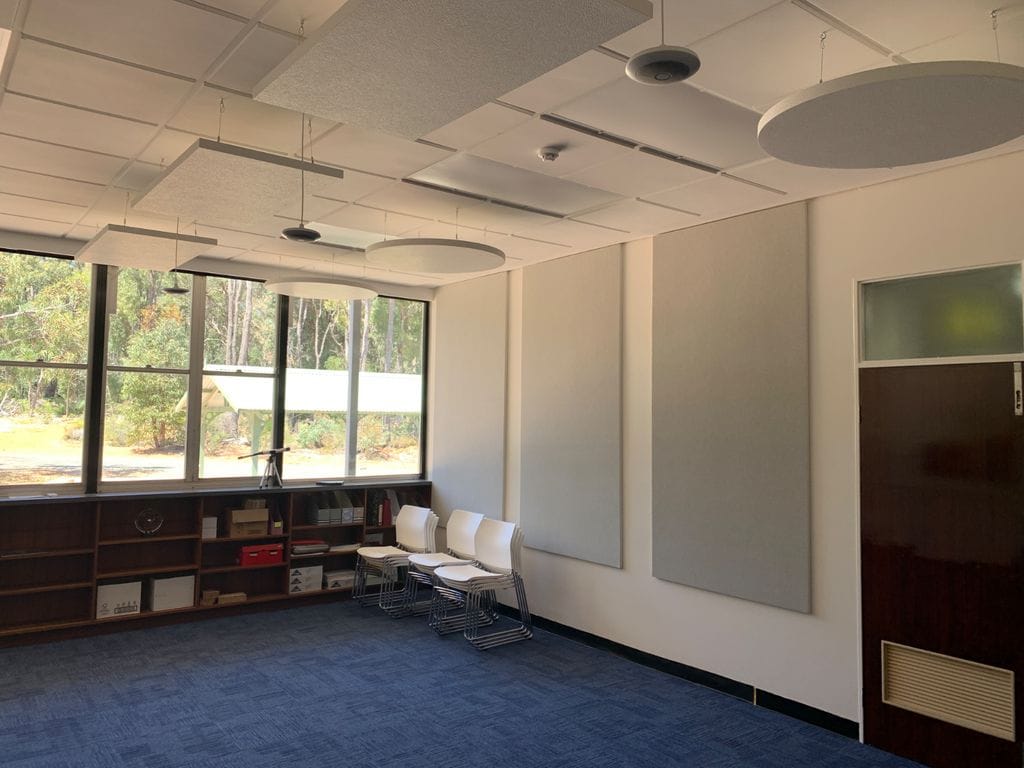
To tackle the acoustic challenges, we installed three ceiling pendant microphones spaced strategically throughout the room, ensuring comprehensive microphone coverage. This solution significantly improved audio clarity during virtual meetings and presentations.

To enhance sound absorption and minimize reverberation in the room, we implemented a combination of ceiling-suspended cloud panels and wall-mounted acoustic panel treatments. These acoustic treatments not only contributed to better sound quality but also created a more comfortable and distraction-free learning environment. The implementation of the above solution transformed Perth Observatory’s classroom into a hub for efficient and clear communication.


Enriching Archery WA’s Clubhouse and Outdoor Experience with a Comprehensive Sound System

By Jacinta,

Enriching Archery WA’s Clubhouse and Outdoor Experience with a Comprehensive Sound System

Client Name: Archery WA

Objective: Archery WA sought to enhance its club’s ambiance and communication by installing a versatile sound system that covered both the interior of the club house and its vast outdoor areas.

Client’s Requests and Goals: The client’s primary objective was to establish a multi-zone sound system capable of providing extensive coverage across their spacious outdoor areas while also delivering audio support within the club house.

Site Visit and Analysis: Our team conducted a thorough site visit, collecting measurements and conducting modelling exercises to determine the most suitable equipment and functionality required for the project.

Challenges Faced: A major challenge was ensuring adequate coverage for the large outdoor areas while adhering to a cost-effective budget. Sourcing equipment that could meet these criteria was essential.

Proposed Solution and Rationale: We recommended the installation of all-weather long-throw speakers mounted on custom roof brackets, strategically positioned to cover the extensive outdoor areas. Additionally, we proposed a multizone mixer and amplifiers that enabled multizone paging and offered the flexibility to select alternate sources for individual zones. This solution ensured a tailored and adaptable sound experience for Archery WA.

Client’s Decision: The client opted for our proposed solution, which perfectly aligned with their need for extensive outdoor coverage and flexibility in sound management.

Empowering Collaboration with Microsoft Teams Room

By Jacinta,

Objective: Our Client aimed to enhance their collaboration and communication capabilities by implementing a Microsoft Teams Room Video Conferencing System paired with an 86” IG-Touch Interactive Display. This solution also involved repurposing existing equipment to optimize technology use in different spaces.

Client’s Requests and Goals: Our Client’s primary goal was to facilitate seamless video conferencing meetings and enable local boardroom display and interactive whiteboarding. They sought a solution that would streamline communication and collaboration.

Site Visit and Demonstrations: Our team conducted a site visit, gaining insights into our clients’s workspace, and provided a comprehensive demonstration at the 3 Monkeys AV experience center.

Challenges Faced: The primary challenge was the absence of floor cabling ducts and the client’s preference against visible cable covers in the room. These constraints led us to design a solution that incorporated Logitech pendant microphones and the Logitech TAP control screen with an IP-based setup.

Proposed Solution and Rationale: Our solution centered around the client’s requirements and addressed the cabling challenges effectively. The Microsoft Teams Room, coupled with the Logitech Rally Bar and TAP control screen, ensured seamless video conferencing, easy room booking, and one-touch join via the built-in Logitech Collab OS.

Client’s Decision: Our client chose the Microsoft Teams Room solution rather than traditional BYOD or Agnostic VC as this provides a more seamless experience with room booking and one touch join via the built in Logitech Collab OS, enhancing their overall meeting experience.

IQuest – Video Conferencing and Room Acoustic Treatments

By Jacinta,

IQuest’s project involved implementing an Open Space Video Conferencing Solution and Interactive Video Conferencing Solution with Room Acoustic Treatments for their Small Meeting Room space.

Clients Goals:

Open Space Area: IQuest aimed to streamline team communication in their open office area. Their primary goal was to establish a video conferencing system that seamlessly integrated with their PCs to facilitate meetings. They wanted a solution that would ensure effective communication when their team gathered in this open space. Our response was a comprehensive system featuring inconspicuous in-ceiling microphones, a dual display screen video conferencing system, a PTZ camera, and strategically positioned wall-mounted speakers.

Small Meeting Room: In their small meeting room, IQuest sought an interactive video conferencing solution. Their goal was to enable easy system control via touch and leverage Microsoft Teams’ Whiteboarding features during video calls. We recommended the latest Logitech Rally Huddle All-In-One Solution coupled with an IG-Touch interactive display on a height-adjustable stand.

Site Visit and Demonstrations: To fully understand IQuest’s workspace and specific requirements, we conducted both site visits and comprehensive demonstrations at the 3MAV experience center.

Challenges Faced: The small meeting room presented an acoustic challenge that needed to be addressed to ensure optimal audio quality during video conferences.

Solutions Proposed: For the open office area, we delivered a cost-effective and efficient solution that aligned with IQuest’s needs. The agnostic video conferencing system featured top-notch camera, microphone, and speaker components, enabling seamless communication with remote participants in the open space.

To tackle the acoustic challenge in the small meeting room, we designed a simple yet highly effective wall-mounted treatment, immediately improving the room’s audio quality.

Client’s Decision: IQuest opted for the agnostic video conferencing solution due to its compatibility with their IT Support needs and high-quality audiovisual components, ensuring effective communication in the open space.

Huddle room Video Conference Solution

By Jacinta,

Clients Requests/Goals: Our Client approached us with a specific goal in mind: they wanted to establish a reliable video conferencing system with a single display that would facilitate seamless communication for their team members using their own devices (BYOD).

Site Visit and Discussions: To understand their requirements better, we conducted a site visit and engaged in discussions with the client. During our visit, we assessed the available space and existing infrastructure to ensure our proposed solution would integrate seamlessly.

Challenges: The client’s existing setup and infrastructure were well-suited for the proposed video conferencing solution.

Solutions Proposed: Based on our assessment and the client’s specific needs, we recommended a video conferencing solution that utilized a single display. This solution chosen was an all in one Logitech MeetUp 4K ConferenceCam the perfect solution for huddle rooms. This was chosen because it perfectly aligned with our clients goals of conducting small-scale video conferencing with BYOD devices. It provided an efficient and cost-effective way to meet their communication needs without the need for multiple displays or complex installations.

In summary, our collaboration with our client led to the successful implementation of a video conferencing solution that precisely aligned with their goals. Through a site visit and discussions, we ensured that the proposed solution seamlessly integrated into their existing infrastructure. The client now enjoys the benefits of a streamlined, BYOD-compatible video conferencing system that enhances communication within their organization.

Ashdale Secondary College – Display with multiple HDMI input with matrix system

By Jacinta,

Our clients goal was to have multiple large screens in a single location with the option to select different HDMI inputs (Apple TV, Microsoft Wireless Display Adaptor & Wall plate).

A Site visit was completed by our Senior Sales Consultant Daniel, were each room was measured to fit the largest TV possible for that space.

One factor we had to counter in was that we had to ensure we selected the correct matrix with front facing buttons, for ease when our client is selecting source buttons. Happy to provide a solution that matched every single requirement by client.

North Metropolitan Tafe

By Jacinta,

Installation of a large venue projection system for a Tafe lecture theatre space. We replaced the clients projector with a new high brightness solution. The Projection system was accompanied with a high quality audio system with 2 x wall mounted speakers, a podium microphone located at the lectern for presentations and a easy to us 6 button AV Controller custom programmed specific to our clients requirements for easy use of the system.

Immaculate Heart Parish Church AV

By Jacinta,

SUMMARY

Our client approached 3 Monkeys AV wishing to upgrade their projection and audio system. Immaculate Heart’s existing projection system lacked brightness and clarity and did not cater for modern display formats. The audio system was suffering from audio feedback issues and a general lack of speech intelligibility. The system was also difficult to operate with multiple steps required to conduct simple day to day ceremonies.

CLIENTS GOALS

  • Upgrade of the projection to achieve larger, brighter, display able to cater to current video formats.
  • Upgrade to an audio system that provided clear intelligible speech and music reproduction.
  • An AV system that was easy to control with very little user training required to operate.

CHALLENGES

As with many houses of worship, the Immaculate Heart Church presented some acoustical challengers, with high ceilings and reflective surfaces resulting in a highly reverberant environment prone to microphone feedback. The projection system design had to perform at high level while having as little adverse effect to the Churches exceptional aesthetic features.

SOLUTIONS

3 Monkeys AV installed an easy-to-use touch screen controller customised specifically for our client, with only buttons and controls relevant to their specific AV System. Use of the system was further simplified by programming customised buttons that include several commands under the one button.

The installed audio system includes the use of the Active Audio Ray-on Speakers. The Ray-on speakers are imported exclusively by 3 Monkeys AV in Australia, and were chosen for their low profile and exceptional directivity. The Ray-On speakers were able to direct sound onto the seated areas of the Church, providing a more direct sound to the listeners ear, reducing reflective sounds providing clear intelligible speech and music reproduction.

Projection system – 2 x high brightness laser projectors along with 2 x 140” Motorised Projection screens were installed, along with a Video over IP distribution system to connect the client’s content from either the back or front of the Church as required.


CHOOSING THE RIGHT VIDEO CONFERENCING SOLUTION FOR YOUR BUSINESS!

By Jacinta,

Video conferencing has become a big part of the world we live in. Many businesses worldwide rely on this form of communication, whether it’s to speak to prospects, clients or colleagues. It’s important you have the video conferencing system you can trust.

Choosing the right video conferencing solution for your business is important, that is why we come to your office for a FREE site visit, to review you space and discuss your requirements prior to quoting, alternatively we can also offer a telephone or video chat consultation. We then get to work, designing you a solution best suited for your business.

There are 3 main considerations to keep in mind when deciding on your video conferencing solutions.

They are: integration, room size/number of people using your room and what your video conferencing system/room is used for and who is using it.

1. Integration

What applications does your business use? Are you using Microsoft Teams? Zoom? Google Meet? Skype? Do you use multiple applications?

We offer solutions that can be locked to specific applications eg, where only Microsoft Teams can be used in certain rooms. However, sometimes this can cause future issues if you have someone that wants to have a Zoom meeting in your locked room and is unable to. We offer Hybrid room solutions that enable the use of all applications.

2. Size of your room & How many people sit in the meeting

Below is a guide to differentiate the types of meeting room sizes to determine your video conferencing requirements:

Huddle Room/Huddle Space:

3 to 5/6 people
Length: 2 to 5 meters

Medium Meeting Room/Small Boardroom:

6 to 10 people
Length: 5 to 7m

Large Meeting Room/Boardroom:

10 to 20 people
Length: 8+ meters (generally quite a wide room)

Auditorium/Custom Video Conferencing/Presenting space:

20+ People

3. What your video conferencing system/room is used for and who is using it.

Are you a large corporation? Do you provide a public meeting space? Is your boardroom only used by staff or a range of outside presenters?

Video conferencing solutions can be tailored for small scale usage, only by staff within your organisation, all operating with the same network and applications. However, if your meeting room is used by a range of people, including those from outside your organisation, issues can arise with people modifying the existing PC, altering settings and impacting on the functionality for subsequent users. In these circumstances we can offer a BYOD room solution which has the ability for anyone to bring their own device and connect to the system without the need to utilise and alter a dedicated PC.

The above is a brief guide to some considerations to take into account when choosing a video conferencing solution for your business. Bespoke solutions for video conferencing can take into account these three main factors, they can also incorporate a large number of other variables including:

Additional microphones, cameras, speakers or displays and their placement, touch control systems and interactive technology, mobile solutions, wireless connectivity and cabling requirements.

Addressing all these factors can create a trustworthy, easy to use video conferencing solution. Leave it to the experts to consider these factors and design a solution best suited to your business.

Call us on (08) 9228 1681 to book in for a free AV site analysis so we can discuss all your requirements and provide a quote for a video conferencing solution you can trust.