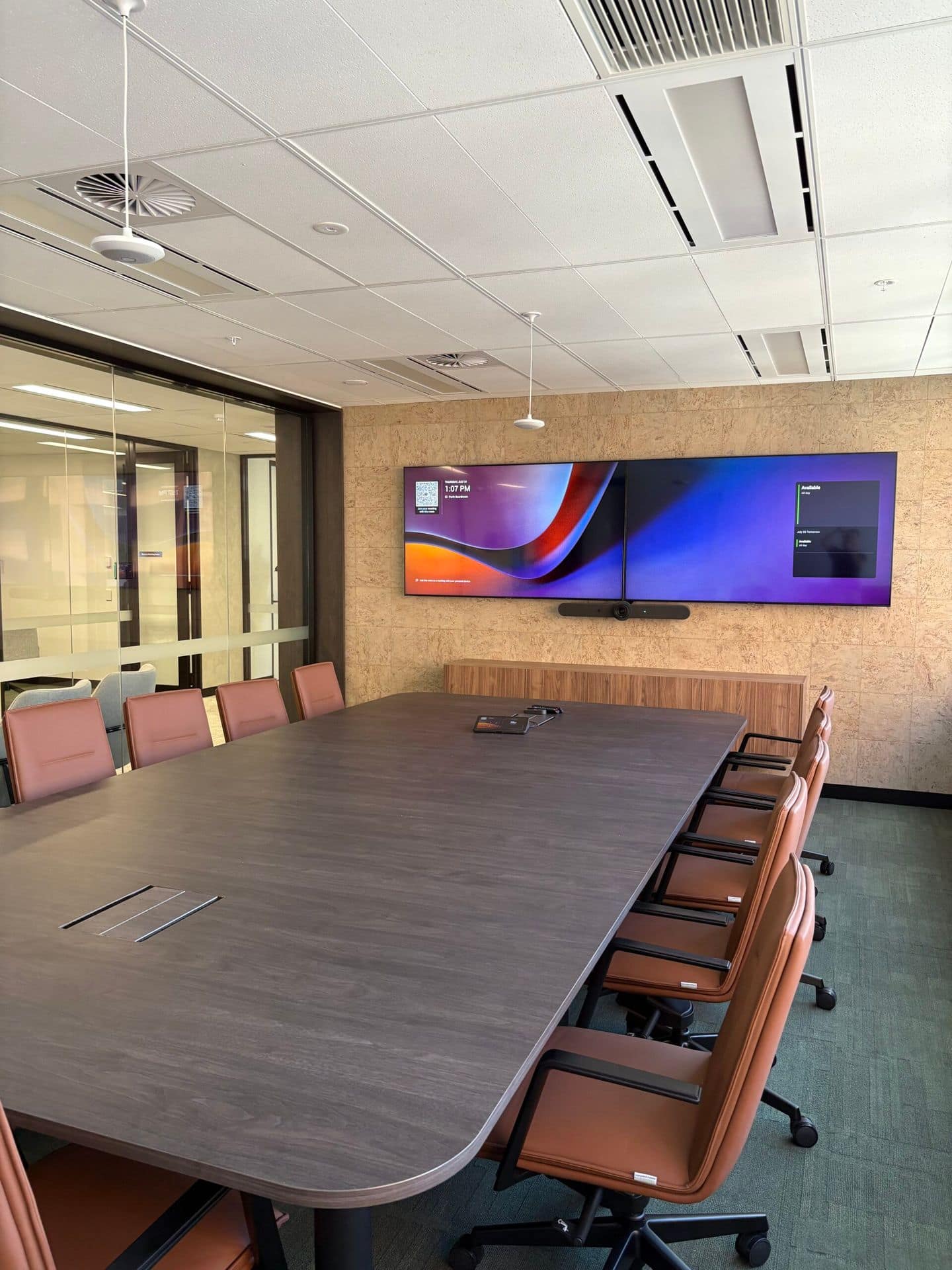
What Should You Consider Before Installing an Interactive Whiteboard?

By Francis Fragomeni,
What Should You Consider Before Installing an Interactive Whiteboard?

Get the size wrong, the mounting height wrong, or the software wrong, and a multi-thousand-dollar interactive panel quickly becomes an expensive screen nobody actually uses. This happens more often than most buyers expect, and it’s almost always avoidable. Interactive whiteboard installation isn’t a simple purchase decision; it’s a planning exercise, and the businesses and schools that treat it that way end up with boards that genuinely get used every day.

Interactive whiteboards have become central to how modern classrooms and offices operate, but choosing the wrong specification or skimping on proper installation can undo most of that value before the board is even switched on. This guide breaks down exactly what to weigh up before any interactive whiteboard installation, so the board you choose earns its place on the wall.

Why Interactive Whiteboards Are Becoming Essential in Modern Spaces

Interactive whiteboards have moved well beyond being a high-tech replacement for chalk and markers. In education, they now function as collaboration hubs and digital bridges connecting students, teachers, and learning resources, supporting everything from live annotation to hybrid lessons where remote and in-room students interact with the same material simultaneously. Emeralddocument

The appeal isn’t just engagement, either. There’s a genuine productivity case. Teachers using a well-integrated interactive display can recover an estimated 5 to 10 minutes per day in reduced setup and transition time, which adds up to real hours redirected toward teaching across a school year. In corporate boardrooms and training rooms, the same logic applies: less time fighting with cables and switching between devices, more time actually presenting. On-Site Technology

Understanding Interactive Whiteboard Technology

Modern boards, often called interactive flat panel displays, combine a touch-enabled screen with built-in software, wireless casting, and in many cases video conferencing integration, all in a single unit mounted on the wall. Some run their own operating system, while others rely entirely on a connected laptop or device.

The right type depends heavily on context. Non-OS panels rely on a connected laptop, tablet, or desktop to run software and apps, offering flexibility and lower upfront cost with less ongoing firmware maintenance, which suits environments where staff or teachers already use their own devices. Boards with a built-in operating system, by contrast, work independently and suit spaces where a dedicated, always-ready setup matters more than flexibility. Parmetech

Important Factors to Consider Before Interactive Whiteboard Installation

Getting smart whiteboard installation right starts well before any equipment is ordered.

  • Room size and viewing distance are the most commonly overlooked factors. Industry guidance suggests the screen’s diagonal size in inches should roughly match the viewing distance in feet multiplied by six, meaning a classroom with a 20-foot back-row distance typically needs an 86-inch board, while a smaller boardroom with a 12-foot viewing distance is usually well served by a 65 or 75-inch panel. On-Site Technology
  • Software and ecosystem fit matter just as much as hardware. A board chosen without checking compatibility with existing platforms, whether that’s Google Workspace, Microsoft 365, or a specific video conferencing tool, often ends up underused because staff default back to familiar workarounds.
  • Durability and daily use should factor into any classroom-focused installation, since panels in school settings face far more wear and tear than a boardroom display ever will.
  • Mounting height and placement affect both usability and safety. Boards mounted too high frustrate younger users or shorter staff, while poor placement undermines the very engagement the board is meant to create.

Choosing the Right Smart Whiteboard Installation for Your Needs

There’s no single “best” board, only the right board for the specific room and the specific users.

Setting Typical Priority Recommended Approach
Primary classroom Simple, icon-driven interface, large touch targets Boards with intuitive, child-friendly navigation
Secondary/high school Subject-specific tools, multi-touch collaboration Boards supporting simultaneous multi-user input
Corporate boardroom Video conferencing integration, professional presentation Boards with built-in conferencing and wireless screen-sharing
Training and meeting rooms Flexibility across presenters and devices Non-OS or BYOD-friendly panels

 
Budget realistically enters the conversation here too. Pricing varies considerably depending on size, brand, and built-in features, and one current vendor buying guide puts established board ranges at around $2,799 for a budget-friendly 65-inch panel through to $7,000 or more for a premium 75-inch board with advanced collaboration features. Matching the specification to the actual room, rather than buying the most feature-heavy option available, is usually the better long-term decision. Vibe

Common Mistakes to Avoid During Digital Whiteboard Setup

Even with the right board chosen, digital whiteboard setup still goes wrong in predictable ways. Mounting height is one of the most frequent issues, particularly in primary schools where boards need to be reachable by smaller students without excluding older students or staff. Network and connectivity oversights are another common trap, since boards relying on wireless casting or cloud storage need reliable infrastructure already in place, not bolted on afterwards.

Skipping proper staff or teacher training is often the most expensive mistake. Without adequate training, even the most advanced interactive panel can end up being used as nothing more than a basic display, leaving many of its collaboration and productivity features unused. Finally, failing to plan for future integration with video conferencing platforms, classroom management software, or other audio visual Perth solutions can result in costly upgrades or system replacements within just a few years.

Why Professional Interactive Whiteboard Installation Matters

A board that looks straightforward to mount can still go wrong in ways that aren’t obvious until it’s already in daily use. Cabling routed incorrectly, mounting that doesn’t account for wall type or weight load, and software never properly configured for the school or business network all create ongoing frustration that’s expensive to fix after the fact.

Professional installation also ensures the board is positioned correctly from the outset, with sightlines and glare properly accounted for, alongside genuine integration with any existing AV or conferencing systems already in the room. For schools specifically, this also means the board fits within a broader Schools and Education technology plan, rather than sitting as an isolated purchase nobody fully accounted for.

Conclusion

An interactive whiteboard is only as good as the planning behind it. Room size, software compatibility, durability, mounting height, and staff training all directly determine whether a board becomes a daily teaching or collaboration tool, and the data backs this up: teachers with a well-integrated display recover 5 to 10 minutes of usable teaching time per day that a poorly specified board simply won’t deliver. On-Site Technology

If you’re considering an interactive whiteboard for a classroom, boardroom, or training space, the smartest first step is a proper site assessment rather than guessing at size and specification. At 3 Monkeys AV, we run a free $250 AV system analysis for every Perth school and business. As the only supplier of EduTouch interactive panels in Western Australia, we design, supply, and install your system ourselves, then train your staff with no subcontractors and no hidden costs involved. Get in touch with 3 Monkeys AV to find the right interactive whiteboard setup for your space.

 

What Are Interactive Panels and How Do They Work?

By Francis Fragomeni,
What Are Interactive Panels and How Do They Work?

Touch a screen, and it responds instantly, whether you’re writing, sharing a file, or jumping into a video call. That’s the entire premise behind modern interactive panels, and it’s exactly why they’ve replaced the old whiteboard-and-projector combination in classrooms, boardrooms, and training rooms across Perth. This really comes down to one idea: a single screen doing the job that used to take three separate pieces of equipment.

Interactive panels have become one of the most practical upgrades a school or business can make, but most buyers still aren’t entirely sure what’s happening behind the screen, or what actually separates a good panel from an expensive disappointment. This guide breaks down how the technology works, the types available, and what genuinely matters before choosing one.

What Is an Interactive Panel?

An interactive panel, also called an interactive flat panel display, is a large touch-enabled screen that combines a high-definition display with built-in computing, software, and connectivity into a single wall-mounted unit. Rather than relying on a separate projector, laptop, and whiteboard, everything happens on one screen.

A typical panel brings together several core elements working as one system: a touch layer that detects input, embedded computing that runs apps and whiteboard software without a separate computer, connectivity ports for laptops and other devices, and an integrated audio system supporting video conferencing and voice capture. Together, these elements turn the panel into a responsive digital workspace rather than just a bigger screen. 

How Do Interactive Panels Work?

The touch technology itself is where most of the engineering happens. Most commercial interactive panels use one of two main methods.

Infrared touch is the most common approach in large-format panels. It works by using a grid of infrared LEDs and photodetectors around the edges of the screen, where touching the screen interrupts the light beams, and the system calculates the touch point from which the beams are broken. Capacitive touch, the same technology used in smartphones, works differently, detecting touch by sensing the electrical charge created when a finger touches the screen. 

Feature Infrared (IR) Touch Capacitive (PCAP) Touch
Cost at large sizes More affordable More expensive to scale
Touch input Works with finger, stylus, or any solid object Typically bare finger or active stylus only
Accuracy Accurate, slight gap possible when writing Highly accurate, no writing gap
Multi-touch support Up to 40-point input on most panels Strong multi-touch, often 100-point
Best suited for Large classrooms, boardrooms, budget-conscious setups High-end offices, exhibition spaces, premium displays

 
Both technologies achieve the same outcome: turning a touch or gesture into a digital action on screen, instantly and without a stylus tethered to the wall.

What are the Types of Commercial Interactive Panels?

Not every interactive panel is built the same way, so choosing the right solution depends on your space, workflow, and collaboration requirements. An experienced audio visual Perth provider can help you select the most suitable option for your business.

  • Built-in OS panels: run independently without a connected computer, suited to spaces needing a dedicated, always-ready setup.
  • Non-OS panels: rely on a connected laptop or device to power the display, suited to businesses that prefer using their own existing devices and software, usually at a lower upfront cost.
  • Panel size: typically ranges from 55-inch displays for smaller huddle rooms up to 86-inch and larger panels for big classrooms, lecture halls, or boardrooms where every seat needs a clear view.

What are the Key Features of Modern Interactive Panels?

Beyond touch and screen size, a handful of features define what makes a genuinely useful interactive panel:

  • High-resolution display, often 4K, ensuring text, images, and video stay crisp even from the back of a large room.
  • Built-in connectivity, including HDMI, USB, and wireless screen sharing, so laptops, tablets, and phones connect without extra hardware.
  • Integrated audio systems with microphone arrays, supporting video conferencing directly through the panel and removing the need for separate equipment in many rooms.
  • Embedded software and app support, meaning whiteboarding, annotation, and presentation tools are ready to use straight out of the box.

Interactive Panels vs Traditional Whiteboards

The difference becomes clear once you compare what each option can actually do.

Capability Traditional Whiteboard Interactive Panel
Writing and annotation Markers only, easily erased Digital annotation, saved and reusable
Sharing content Photograph the board or rewrite manually Instant digital sharing and export
Video and multimedia Needs a separate screen or projector Built directly into the panel
Video conferencing Not possible without extra equipment Often built in or easily integrated
Reusability Content lost once erased Sessions saved, reused, and updated

 
For any space relying on collaboration, presentations, or hybrid meetings, this gap in capability is usually what tips the decision toward upgrading.

Where Interactive Panels Are Commonly Used?

Interactive panels have moved well beyond classrooms.

– Schools use them daily for lessons, annotation, and hybrid learning, often as part of a broader Schools and Education technology setup.

– Corporate boardrooms rely on them for presentations and video conferencing without separate AV equipment cluttering the room.

– Training rooms use panels to run interactive sessions across multiple devices and presenters, and council chambers and public sector meeting spaces increasingly use them to support clearer presentations and recorded proceedings.

What are the Important Factors to Consider Before Choosing Interactive Panels?

A few things genuinely determine whether a panel performs well in your space, rather than just looking good in a showroom:

  • Touch technology: infrared suits large rooms and budget-conscious setups, while capacitive offers sharper accuracy for premium or smaller installations.
  • Panel size: should match the room’s viewing distance, not just the wall space available; an undersized panel in a large room defeats the purpose.
  • Software ecosystem: needs to fit what your school or business already uses, whether that’s Google Workspace, Microsoft 365, or a specific teaching or conferencing platform.
  • Sunlight exposure: matters more than most buyers expect, since infrared touch technology can be affected by direct sunlight, interfering with the light beams used to detect touch, making placement away from large windows worth planning for upfront.
  • Connectivity needs: check the panel supports the devices your staff or students actually use day to day, not just the demo unit’s specs.

This is also where it pays to get the room properly assessed before choosing a panel, rather than guessing at size and specification based on price alone.

Bottom Line

Interactive panels have replaced the projector-and-whiteboard combination for good reason. They combine display, touch, computing, and conferencing into one reliable system, removing the clutter and guesswork that used to come with every presentation or meeting. Understanding how the touch technology actually works, and matching the right panel type to your specific room, is what separates a panel that gets used daily from one that quietly becomes an expensive, underused screen.

If you’re weighing up commercial interactive panels for a classroom, boardroom, or training space, getting the specification right matters more than the brand on the box.

At 3 Monkeys AV, our team carries out a free site assessment for every Perth business and school, matching the right panel, touch technology, and size to your actual room before a dollar is spent. We’re WA’s only authorised EduTouch supplier, and every job runs through us directly, from supply and installation to staff training, with clear, itemised pricing and no subcontractors involved. Get in touch with 3 Monkeys AV to find the right interactive panel for your space.


Acoustic Office Booths

By Jacinta,

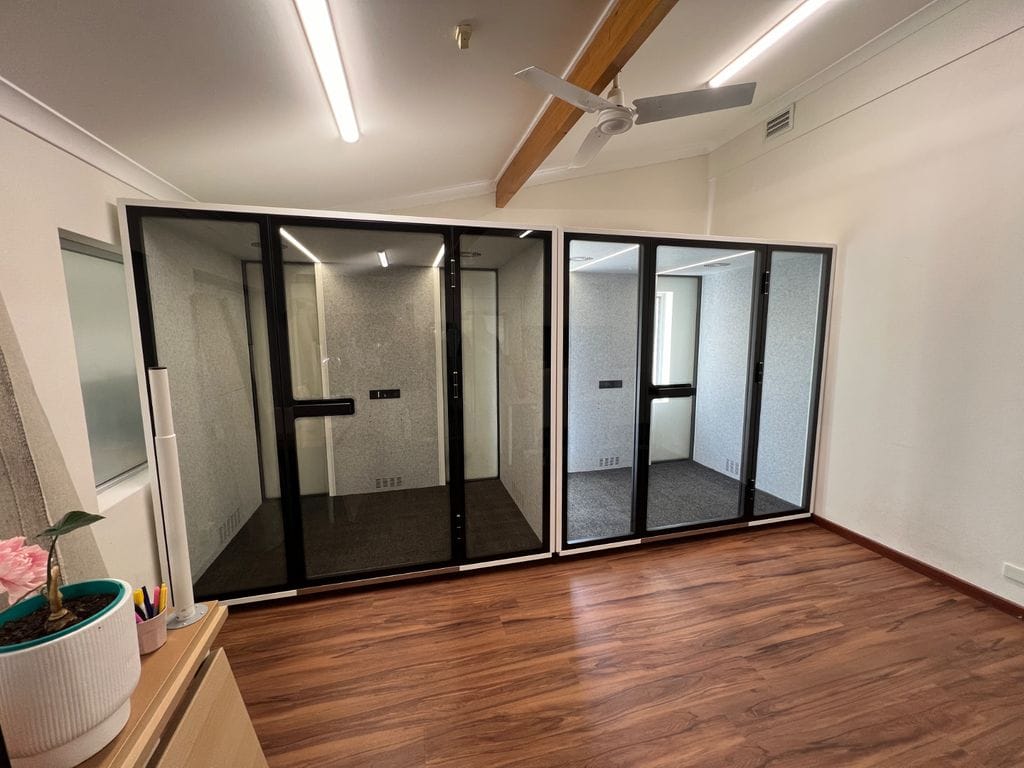
We recently installed our RoomCube acoustic booths in a local recruitment office that was quickly outgrowing its existing space. To help them adapt, we provided a 1-person phone booth along with two 4-person meeting booths. These soundproof booths offer a quiet, private space ideal for phone calls, interviews, and focused team discussions—making them a perfect solution for busy office environments where privacy and concentration are essential. The addition of the RoomCube booths has helped the team maximize their existing floor plan without the need for major renovations.

Digital Signage Solutions Guide

By Jacinta,

Modern digital signage transforms the way organisations communicate with visitors, staff, and clients. From hospitals to schools, offices to restaurants, tailored signage can inform, engage, and inspire in any environment.

Hospital & Medical Centre Digital Signage

Digital signage for healthcare environments ensures patients, visitors, and staff receive clear information quickly.

  • Display wait times, directions, and announcements.
  • Share important health and wellness messages.
  • Reduce perceived wait times with engaging video content.
  • Provide multi-language support for diverse communities.

Recommended use: waiting rooms, reception desks, corridors, and specialised clinic areas.

School Digital Signage

Schools benefit from interactive and informative signage that connects students, staff, and parents.

  • Showcase timetables, alerts, and upcoming events.
  • Celebrate student achievements and display creative content.
  • Create dynamic wayfinding in large campuses.
  • Use as emergency broadcast tools for safety communication.

Recommended use: reception, libraries, classrooms, assembly halls, and cafeterias.

Corporate Office Digital Signage

Corporate signage enhances communication while reinforcing brand culture.

  • Display KPIs, live dashboards, and company announcements.
  • Welcome clients with tailored branding or presentations.
  • Provide live video conferencing integrations.
  • Use digital noticeboards to replace static posters and memos.

Recommended use: boardrooms, reception areas, office floors, breakout spaces.

Restaurant & Café Digital Signage

Hospitality environments rely on digital signage to streamline menus and promotions.

  • Create live-updatable digital menus with pricing and promotions.
  • Highlight new products or chef’s specials.
  • Integrate with POS systems for real-time offers.
  • Entertain guests while reducing perceived wait times.

Recommended use: behind the counter, drive-through, window displays.

Retail Store Digital Signage

Retail signage helps increase sales, showcase promotions, and create memorable experiences.

  • Highlight sales, seasonal promotions, or new arrivals.
  • Run dynamic advertisements for maximum impact.
  • Use interactive kiosks for wayfinding or self-service browsing.
  • Leveraging high-brightness screens for street visibility.

Recommended use: shopfront displays, point-of-sale counters, and demonstration zones.

Installation Options

We provide flexible display options to suit a wide range of environments, whether indoors, outdoors, or in high-brightness window areas.

  • Wall Mounted Displays – Ideal for lobbies, classrooms, and waiting areas.
  • Freestanding Floor Stands – Flexible for events, exhibitions, and temporary needs.
  • Mobile Trolleys – Perfect for classrooms, training rooms, and multi-use spaces.
  • Window Signage Displays – High-brightness screens designed for shopfronts.
  • Floor-to-Ceiling Stands – Sleek installations for modern offices or corporate showrooms.

Content Management with Fusion Signage

Managing and updating your content should be simple. With Fusion Signage software, businesses can drag, drop, and create content in minutes.

  • User-friendly interface accessible to all staff.
  • Schedule content to specific times or days.
  • Manage multiple screens from a single dashboard.
  • Instantly deploy updates across multiple locations.

5 Questions to ask when upgrading your school Audiovisual Equipment

By Jacinta,

5 Key Questions To Ask Yourself When Upgrading Classroom AV!

1. What Type of Classroom Is It?

  • General classrooms, science labs, and specialist rooms (like drama or art) have unique AV requirements.
  • Consider room size, audio needs, and layout (including windows, partitions, and available mounting positions).
  • Mobile setups may be required where wall mounting isn’t possible.

2. Projector or LED Panel: Which Display Fits Best?

Feature Projectors LED/TV Displays
Cost Lower upfront cost Higher upfront; no ongoing costs
Image Size Largest, especially for big classrooms Large, but fixed panel sizes (55–100”)
Brightness Affected by ambient light Superior, consistent in bright rooms
Maintenance       Requires lamp/filter replacement Maintenance-free
Interactivity Limited; projectors need calibration Touch, annotation, collaboration built-in

3. Interactive or Display Only?

  • Interactive solutions support teaching styles and student engagement, especially with built-in collaboration software and wireless device sharing.
  • Choose systems providing training/support for ongoing technology integration into the classroom.
  • Interactive LED panels deliver high brightness, multitouch capability, and all-in-one reliability, ideal for most modern classrooms.

4. What Do I Need to Connect and Where?

  • Evaluate current and future devices (PCs, tablets, doc cameras) for compatibility with new displays.
  • Properly located input panels prevent cable chaos and ensure safe, reliable connections.
  • Confirm with the AV supplier what length of cable you require for video (HDMI) and USB (Touch if Required).

5. What Training & Support Are Provided?

  • Teachers need tailored training sessions to master new hardware and software.
  • Select suppliers offering thorough onboarding, on-going support, training, warranty, and replacement services to guarantee long-term satisfaction.
  • 3 Monkeys AV don’t subcontract, our team are our AV experts and have a dedicated support team, we also offer FREE and ongoing training to schools.

Main Types of Classroom AV Systems

  • Ceiling Mounted Projector & Drop Down Screen: Best for halls/large groups where interactivity isn’t required.
  • Extreme Short Throw Wall Projector: Cost-effective, large image for classrooms; some maintenance needed. Can be interactive or non-interactive projectors.
  • Interactive LED/TV Display (Wall or Trolley): High image quality, interactive features, mobile options for flexible learning spaces.
  • Mobile Trolley Displays: Perfect for resource sharing between rooms or adjustable-height needs.

Next Steps: Book Your Free AV System Analysis

Contact (08) 9228 1681, email info@3monkeysav.com, or visit www.3monkeysav.com to schedule a complimentary school AV consultation and proposal. Receive a full site analysis, tailored system recommendations, and expert planning to create modern, engaging learning environments.

Why Choose an All-in-One PA System for your School

By Jacinta,

If your school hall or undercover area struggles with sound, an all-in-one PA system can make assemblies, productions, and events far more enjoyable for students, staff, and parents. The 3 Monkeys AV Triple PA System is designed to be simple, reliable, and versatile for everyday school use.

Clear Sound for Every Audience

With four 10-inch speakers and a built-in 1.5” compression driver, this system delivers clear speech and natural projection, even for parents listening from outside undercover areas. The speaker design ensures that every voice—from teachers to students—can be heard without strain.

Simple to Use

The system is built with schools in mind. A single power button turns everything on, and labelled, colour-coded faders make volume adjustments easy, even for staff with little technical experience.

Easy Device Connections

From laptops and iPads to USB drives and Bluetooth devices, connecting audio sources is straightforward. A slide-out tray and resting shelf provide a convenient spot for devices during assemblies or events.

Built-In Protection

Housed in a sturdy road case, the system is designed for school environments. Built-in electronic safeguards also protect the speakers and amplifier from accidental overload.

Flexible for Any Event

The PA system isn’t limited to assemblies. With a portable speaker kit, it can be used outdoors for sports days, ceremonies, fetes, or even moved indoors for discos and performances.

Training and Support

Each installation includes on-site training to get staff confident in operating the system within minutes. Ongoing support is included, whether by phone, email, or additional training sessions whenever needed.

Why Schools Choose an All-in-One PA

Reliable, high-quality sound coverage

Intuitive operation for non-technical users

Multiple device connection options

Portable for both indoor and outdoor events

Long-term support for peace of mind

For schools looking to improve assemblies and events, an all-in-one PA system provides a practical and future-proof solution.

LED Screens vs. Projectors: Which Display Solution is Best for Your Large Venue?

By Jacinta,

Both LED screens and modern projectors now offer vibrant, high-quality displays, even in spaces with significant ambient light. Advances in laser projector technology make them a serious contender for venues like school undercover areas, auditoriums, and large, multi-purpose rooms. Here’s what you should consider when making your choice.

Brightness and Visibility

  • LED screens deliver the highest brightness and contrast, remaining crystal clear even in direct sunlight or brightly-lit environments. This makes them perfect for outdoor areas, digital signage, and spaces with no light control.
  • High-brightness laser projectors, with outputs from 5,000 to over 8,000 lumens, offer impressive clarity in well-lit spaces such as open undercover areas, classrooms, halls, or daytime events. Utilizing specially designed projector screens and strategic placement ensures vivid, readable images for large audiences.
  • Unlike older lamp-based models, today’s laser projectors can perform nearly as well as LED screens in high ambient light, especially when used in shaded or partially-enclosed locations.

Installation and Flexibility

  • LED displays require permanent mounting and more structural support but are modular and can be built in practically any size or shape.
  • Laser projectors can be ceiling-mounted, wall-mounted, or portable, allowing for flexible use in multi-purpose spaces. Projectors can deliver ultra-large images (up to 300″ and more) without increasing installation footprint.
  • Ultra short-throw projectors and laser projectors minimize shadows and keep teachers or presenters from blocking the screen, which is ideal for open-plan learning spaces.

Maintenance, Total Cost, and Lifespan

  • LED screens have a higher up-front investment but require minimal long-term maintenance and have long lifespans.
  • Laser projectors boast up to 30,000–40,000 hours of maintenance-free operation, outperforming old lamp projectors and keeping running costs down. They require minimal servicing, dependant on the environment if outdoors etc. For large, budget-conscious installations, projectors still offer the lowest cost per screen inch, especially when large displays are needed.

Expert Recommendations

  • Choose LED screens where permanent, ultra-bright, all-weather visibility is a must, such as in direct sunlight or outdoor signage.
  • Choose high-brightness laser projectors for undercover areas, large school halls, or spaces where flexible, extra-large displays are needed and some shading can be achieved.
  • Ensure the projector is rated for at least 5,000–8,000 lumens for open areas and choose a screen designed for high ambient light for best results.

Contact 3 Monkeys AV to discover the ideal display technology for your school, business, or event space. Our team can recommend and demonstrate both LED screens and high-brightness projectors tailored to your requirements.

Why Choose EduTouch Interactive Panels for Your School?

By Jacinta,

Why Choose EduTouch Interactive Panels for Your School?

Schools often ask us: What makes EduTouch Interactive Panels different from the rest?

The truth is, when you look strictly at specifications and technical details, most interactive panels are quite similar. What truly sets EduTouch Interactive Panels apart is the complete support, training, and warranty coverage that come with them. As a dedicated EduTouch supplier, here are five key reasons why schools trust us as their AV partner.

1. Industry-Leading 7-Year On-Site Warranty

EduTouch offers the longest warranty of any interactive panel: a 7-year on-site guarantee.

  • Your school will never be left without a working system.
  • If any issue arises, our team ensures a fully functioning panel remains in your classroom.

This level of protection gives schools true peace of mind and safeguards their investment.

2. Free and Ongoing Teacher Training

We believe technology should empower teachers, not overwhelm them. That’s why we provide free, ongoing training for the lifetime of the panel.

  • New teachers joining your school? We’ll provide refresher sessions.
  • Need help maximizing advanced features? Our trainer will revisit your classrooms.
  • Training covers both hardware and software, ensuring staff and students get the best outcomes.

Hands-on learning and support means your teachers stay confident using their EduTouch Panels.

3. Dedicated Post-Installation Support

Our relationship with schools doesn’t end after installation.

  • We provide free support via phone or email, delivered directly by our expert EduTouch Support Team.
  • No lengthy waiting times or slow responses—your staff get fast, reliable help whenever it’s needed.

This commitment ensures classrooms run smoothly with minimal disruptions.

4. In-House Technicians, Not Contractors

Unlike many providers, we don’t outsource installation to contractors.

  • Every installation and service is completed by our in-house, highly trained technicians.
  • Our team brings years of experience working specifically with EduTouch Interactive Panels, ensuring professional, consistent service.

This approach guarantees quality and reliability at every stage.

5. Free Educational Software Package

Every EduTouch Interactive Panel comes bundled with free educational software.

  • Applications can be installed on classroom or teacher PCs.
  • Teachers can create and deliver engaging lesson plans, interactive presentations, and online learning modules with ease.

This added value equips schools with powerful tools to enhance digital learning without extra costs.

Why Partner with 3 Monkeys Audiovisual?

Choosing an interactive panel is more than comparing hardware—it’s about choosing the right partner for your school’s long-term success.

With EduTouch Interactive Panels supplied by 3 Monkeys Audiovisual, you get:

  • The longest warranty in the industry
  • Lifetime training and staff support
  • Reliable in-house technicians
  • Ongoing customer service and support
  • A complete educational software suite included

Ready to see the difference yourself? Call us today on 9228 1681 to book a free demonstration of EduTouch Interactive Panels and experience how they can transform teaching and learning in your classrooms.

Guide to Choosing the Right Portable PA System

By Jacinta,

Guide to Choosing the Right Portable PA System

Buying a portable PA system can feel overwhelming. With so many models, sizes, and features available, it’s important to understand what best suits your needs. From audience size and location to wireless microphones and accessories, the right PA setup ensures crystal-clear sound and stress-free operation for your events.

Here are five key factors to consider before purchasing your PA system.

1. Audience Size and Event Location

Not all PA systems are designed for the same crowd size or environment.

  • For large audiences or outdoor events, look at higher-powered options such as the Mipro MA707 (up to 250 people) or the Mipro MA708 (up to 400 people).
  • For smaller gatherings, such as corporate meetings or intimate weddings, compact models like the Mipro MA101 series are lightweight, portable, and excellent for events under 100 people.

Choosing the right system ensures your sound reaches everyone clearly without distortion.

2. Portability and Ease of Use

One of the main advantages of a PA system is portability.

  • Consider weight and size: If you need to carry your unit across venues, beaches, or parks, a lightweight “over-the-shoulder” option may be better than a large wheeled speaker.
  • Built-in handles, wheels, and ergonomic design can make transporting your PA far easier.

The right balance of portability and power keeps your setup quick and hassle-free.

3. Accessories and Optional Features

Today’s portable PA systems come with a range of features to enhance usability. Common options include:

  • Bluetooth streaming for music playback
  • Wired or wireless microphones for presenters, teachers, or performers
  • Built-in CD players or SD card readers for media playback
  • Speaker stands and protective covers for better setup and durability

Think about your typical events to decide which accessories you’ll truly need.

4. Wireless Microphone Compatibility

If your events involve multiple speakers, presenters, or performers, microphone compatibility is crucial.

  • Smaller PA systems may only support one wireless microphone receiver.
  • Larger models, such as the Mipro MA705, MA707, or MA708, can accommodate two receivers, allowing several microphones to be used at once.

This flexibility is ideal for schools, conferences, weddings, and large outdoor ceremonies.

5. Extension Speaker Capability

For events spread across bigger spaces, sound coverage can be challenging.

  • Many models from the Mipro MA705 upwards offer the ability to connect an extension speaker, distributing audio evenly throughout the venue.
  • Extension speakers ensure your message is heard clearly from the front row to the back.

If your audience is spread out, this feature is one of the best ways to guarantee professional-quality sound.

Buying with Confidence

When purchasing your PA system through 3 Monkeys AV, we go beyond selling equipment. We help match you to the best portable PA system based on your audience size, location, and event type. You’ll also receive a personalised training session, so you know exactly how to use all the features of your new system.

Make your purchase simple, stress-free, and fully supported—from advice to aftercare.

What video conferencing solution suits my room size?

By Jacinta,

What video conferencing solution suits my room size?

Choosing the right video conferencing system depends largely on the size of your meeting room and the number of participants. Below is a guide to help determine which Logitech and Yealink bar solutions best fit your space and collaboration needs.

Huddle Room / Huddle Space

  • Capacity: 3 to 5–6 people
  • Room Size: 2 to 5 meters in length

Recommended Solutions:

  • Logitech: Rally Bar Mini — compact, high-quality audio and video designed for small spaces with easy plug-and-play setup. 3 Monkeys Audiovisual can supply, install and support this solution for you.
  • Yealink: MeetingBar A20 — an all-in-one Teams-certified video bar optimized for small rooms with excellent audio pickup and video clarity. 3 Monkeys Audiovisual can supply, install and support this solution for you.

Medium Meeting Room / Small Boardroom

  • Capacity: 6 to 10 people
  • Room Size: 5 to 7 meters in length

Recommended Solutions:

  • Logitech: Rally Bar — premium video and audio bar with modular mics and smart camera control to cover moderate-sized rooms.3 Monkeys Audiovisual can supply, install and support this solution for you.
  • Yealink: MeetingBar A30, A40 or A50 — scalable video bars offering powerful audio processing and AI-based speaker tracking suited for mid-size rooms.3 Monkeys Audiovisual can supply, install and support this solution for you.

Large Meeting Room / Boardroom

  • Capacity: 10 to 20 people
  • Room Size: 8+ meters in length, typically wide space

Recommended Solutions:

  • Logitech: Rally Plus — modular system including multiple speakerphones, mic pods, and PTZ cameras designed to cover large rooms with clear audio and 4K video.3 Monkeys Audiovisual can supply, install and support this solution for you.
  • Yealink: MVC800 or MVC900 series — Room solution kits with advanced video and audio devices including ceiling mics and speaker tracking for large and complex spaces.3 Monkeys Audiovisual can supply, install and support this solution for you.

Auditorium / Custom Video Conferencing / Presentation Space

  • Capacity: 20+ people
  • Room Size: Very large areas designed for presentations and large groups

Recommended Solutions:

  • Logitech: Custom configurations using Rally Plus components combined with additional cameras and audio devices tailored to the auditorium size. 3 Monkeys Audiovisual can supply, install and support this solution for you.
  • Yealink: Custom MVC systems or integration with Yealink MeetingEye series for specialized, high-end video conferencing setups optimized for large venues. 3 Monkeys Audiovisual can supply, install and support this solution for you.